
In 2026, your AI SDR doesn't just send emails — it decides when to drop a personalized video into a sequence, clones your top rep's voice, and fires it to 500 prospects before your first coffee. That's not a future pitch. That's the production reality revenue teams are navigating right now. The question is no longer whether to add video to your sales stack. It's how to integrate it with the agentic AI layer that's already running your outbound motion — and how to get your human reps to actually use it. This guide covers where video sales tech has moved since 2024, how agentic workflows are reshaping adoption, what to look for when choosing a stack, and how to measure whether any of it moves pipeline.
Updated June 2026
Video Sales Tech in 2026: Where the Category Has Moved
Video sales technology in 2026 means AI-powered personalization platforms that let you record a single video and automatically generate thousands of individually tailored versions — using AI voice cloning, dynamic backgrounds, and personalized thumbnails — not just a tool to record your screen and attach it to an email.
That distinction matters enormously. The category has undergone a fundamental identity shift. In 2022 and 2023, "video for sales" largely meant a rep hitting record, narrating a slide deck, and hoping the prospect opened it. By 2024, top teams were experimenting with variable personalization — swapping names and company references into templates. In 2026, the default expectation from buyers and benchmarks alike is AI personalization at scale: every prospect hears their name spoken in your voice, sees their own website or LinkedIn profile in the video background, and receives a thumbnail with their name on it before they even press play.
The reply-rate data validates the shift. HubSpot's State of Sales research documents a sustained decline in cold email reply rates as inboxes grow more saturated. Teams using generic video see marginal improvement. Teams using AI-personalized video — where every element signals "this was made for you" — consistently report 2–3x reply rate improvement over plain-text sequences. Best-in-class programs are hitting 15–22% reply rates on cold outbound, compared to 5–7% for non-personalized equivalents.
Sendspark sits at the center of this shift as an AI video personalization platform purpose-built for B2B sales. The core workflow is straightforward: a rep records one video, Sendspark's AI voice cloning and dynamic backgrounds engine generates individualized versions for every prospect on the list, and each video lands with a personalized thumbnail that shows the prospect's name or company. You don't re-record. You don't hire a production team. You scale.
Gartner's sales technology research confirms the broader consolidation trend: revenue teams are shedding point tools and consolidating around platforms with native AI, deep CRM integration, and measurable pipeline attribution. A standalone video recorder with no analytics and no CRM sync doesn't survive 2026 stack reviews. An AI video personalization platform with trigger-based sends and revenue intelligence integrations does.
The Agentic AI Layer: How AI SDRs and Copilots Reshape Video Adoption
Agentic AI — software that takes autonomous, multi-step actions inside your sales workflow without a human approving each move — arrived in production for revenue teams in 2025 and 2026. It is now the single biggest structural shift in how video gets adopted and deployed at scale. Understanding it isn't optional for any sales tech decision-maker in 2026.
The most visible example is Salesforce Agentforce, which launched to general availability and introduced the concept of CRM-native agents that autonomously handle prospecting tasks, follow-up sequences, and engagement scoring. Alongside Agentforce, a wave of AI BDR startups and AI SDR copilots reached production — tools that don't just assist a human rep but independently manage portions of the outbound pipeline. HubSpot, Outreach, and SalesLoft all shipped copilot features in the same window. For more on how these tools are reshaping the AI in sales landscape, see our deep dive on AI in sales. The result: your agentic workflow can now identify a high-intent signal (say, a prospect visiting your pricing page twice in 48 hours), trigger a personalized video send, and log the interaction in your CRM — with no human in the loop.
This changes the adoption equation for video in a fundamental way. Previously, the biggest friction was rep behavior: would Sarah actually record a video today, or would she default to the email template she's used for three years? With agentic AI, the video send can be removed from the rep's daily decision tree entirely for certain triggers. The AI sales agent handles the "when" and "who." The human rep — or more precisely, their cloned voice and likeness — handles the "what." This human-led, AI-personalized model consistently outperforms pure synthetic avatar approaches because buyers still respond to authenticity signals. A video that sounds and feels like a real person, even when scaled by generative AI, performs better than a fully synthetic avatar that prospects increasingly recognize and distrust. Read more about how sales process automation intersects with video in agentic stacks.
⚠️ Synthetic Media Disclosure Is Now a Legal and Trust Issue
As agentic AI and AI voice cloning become standard in outbound, regulatory pressure around synthetic media disclosure is growing. Several U.S. states and the EU AI Act now require disclosure when AI-generated voice or video is used in commercial communications. Build disclosure language into your video templates and sequence copy now — before it becomes a compliance fire drill.
Trigger-based video sends inside agentic CRMs are where the real scale happens. When Salesforce Agentforce or a comparable revenue intelligence platform detects a qualifying event — a job change at a target account, a champion leaving, a competitor mention in a support ticket — it can fire a personalized video to the right contact within minutes. Sendspark's API and CRM integrations are built for exactly this pattern: your agentic workflow passes a contact list and merge variables, Sendspark's AI voice cloning generates the individualized audio, dynamic backgrounds pull in prospect-specific visuals, and the video is sent through your connected sequence tool. The rep sees it happen in their activity feed. They didn't have to lift a finger, but the video still sounds like them. For a deeper look at the best AI sales tools that complement this workflow, that roundup is worth a read alongside this guide.
One nuance worth flagging: Harvard Business Review's analysis of generative AI in sales found that AI-assisted sellers outperform fully autonomous AI outreach when the product is complex or the deal size is significant. That tracks with what we see in Sendspark data. For enterprise AE sequences, agentic AI should handle the trigger logic and personalization variables, but a human should approve or lightly customize before a video fires to a C-suite contact. For high-volume SDR outreach at SMB, full agentic automation of video sends is already the playbook. Calibrate your agentic workflow to deal complexity, not just team size.
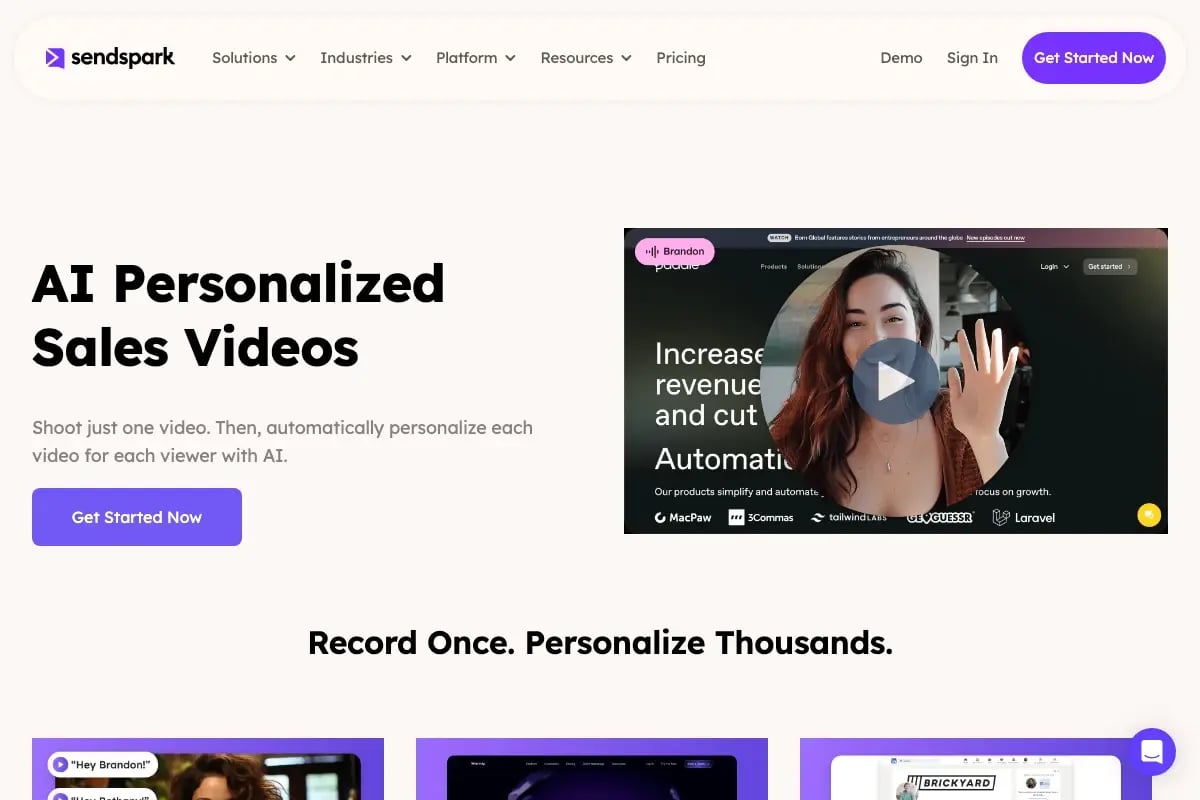
Record One Video. AI Personalizes Thousands.
Sendspark is the AI video personalization platform for B2B sales. Record once, and AI voice cloning generates thousands of individually personalized videos with dynamic backgrounds and personalized thumbnails — each prospect hears their name, sees their website, in your voice. Sales teams see 2-3x more replies.
Get Started NowChoosing the Right Video Sales Stack for Your Team
The five capabilities any video sales tool must have in 2026 are: AI voice cloning for at-scale personalization, dynamic backgrounds that pull in prospect-specific visuals, native CRM sync with two-way data flow, agentic integration support via API or workflow triggers, and granular video analytics tied to pipeline outcomes. Anything missing one of those is a 2023 product in a 2026 evaluation.
When you're running a stack evaluation, cost per personalization unit is a more honest metric than per-seat pricing. A tool that charges $150/seat/month but limits you to 50 personalized videos per rep per month is more expensive than one priced differently but built for volume. Check Sendspark's pricing page for how the unit economics work at different team sizes — the model is designed around usage that scales with pipeline activity, not headcount.
Integration depth is where most evaluations go wrong. Teams ask "does it integrate with HubSpot?" and accept "yes" as an answer. The right question is: does it write back watch data, CTA click events, and engagement scores into contact records in real time? Sendspark's HubSpot integration and Outreach sequence integration both pass video engagement data back to the CRM as activity events, which means your revenue intelligence platform can use watch-through rate as a scoring signal. That's the integration depth that actually changes rep behavior and agentic trigger logic.
| Capability | Why It Matters in 2026 | What to Ask Vendors |
|---|---|---|
| AI Voice Cloning | Enables 1:N personalization without re-recording | How many languages? What's the cloning setup time? |
| Dynamic Backgrounds | Prospect sees their website/LinkedIn in your video | Are backgrounds pulled in real time or static screenshots? |
| CRM Native Sync | Video engagement becomes a pipeline signal | Does it write back watch events as CRM activities? |
| Agentic Integration | Required for trigger-based, no-touch video sends | Is there an API? Does it support webhook triggers? |
| Video Analytics | Without attribution, there's no ROI story for budget | Can you filter by rep, campaign, sequence step? |
| Personalized Thumbnails | First impression before play; drives open-to-play rate | Are thumbnails generated dynamically per contact? |
Also evaluate the tool against your actual use cases — outbound prospecting, AE follow-up after demos, customer success check-ins — rather than a generic feature checklist. Sendspark's sales prospecting solution is purpose-built for SDR outbound at scale, while the platform's template library and analytics layer serve AE and post-sale teams equally well. See the AI video personalization for outbound sales guide for use-case-specific playbooks.
Driving Adoption: From Pilot to Pipeline Impact
Sales tech adoption fails at the manager layer, not the rep layer. The rep doesn't adopt the tool because their manager doesn't reinforce it, doesn't track it, and doesn't model the behavior. Fix the manager problem first and rep adoption follows. That's the pattern the Bridge Group's SDR Metrics Report consistently surfaces — tool underutilization correlates most strongly with manager inspection gaps, not rep resistance.
Start with a tight pilot. Pick eight to twelve reps across two personas: SDRs running high-volume cold outbound, and AEs doing post-demo follow-up. Don't try to solve both problems at once with the same template. SDR video is shorter (60–90 seconds), trigger-focused, and sent at sequence step two or three. AE video is slightly longer, recap-oriented, and sent within 24 hours of a meeting. Map your pilot design to the actual workflow of each persona, or you'll get mixed results that make adoption decisions harder.
✅ Pilot Design Tip
Give pilot reps a "first video" win in week one. Have them record their master template, watch the AI-personalized versions generate for ten real prospects, and send that batch. Seeing their own voice and likeness personalized at scale is the moment adoption clicks. Everything else is reinforcement.
Manager enablement is the lever most rollouts skip. Run a weekly 20-minute video coaching cadence for the first six weeks: pull three videos from that week's activity, watch them together as a team, and give one piece of feedback per video. This isn't a performance review — it's a craft conversation. Which hook landed? Did the CTA ask for something specific? Was the dynamic background relevant to this prospect's industry? This cadence builds a feedback loop that improves video quality faster than any training module.
Compensation alignment closes the loop. If your SDR's quota is pipeline sourced and video activity has no comp connection, video becomes optional when the quarter gets tight. The simplest fix: add a video engagement metric — reply rate from video sequences, or meeting-booked rate from video-first outreach — to the weekly performance dashboard that managers review with reps. You don't have to put it in the comp plan immediately. Inspection alone changes behavior. For a full prospecting playbook that integrates video into rep workflows, the video prospecting guide walks through sequencing and messaging frameworks.
💡 Pro Move: Sales Rep Video Adoption via Peer Proof
Record a 90-second internal video of your top pilot rep walking through their exact video workflow — what they say, where they send it, what reply rates they're seeing. Share it in Slack. Peer proof from a respected rep inside the team outperforms any vendor case study by 10x for driving sales rep video adoption at rollout.
Measuring ROI: The Metrics That Actually Move Pipeline
The leading indicators for a video sales program — reply rate lift, watch-through rate, and CTA click rate — predict pipeline impact four to six weeks before any closed-won data is available. Start tracking these on day one of your pilot, not after you've waited for revenue to show up in the CRM.
Reply rate lift is your first signal. Compare the reply rate on sequences that include a personalized video step against matched sequences that don't. Control for industry, persona, and rep tenure as much as your data allows. A 2x improvement is the baseline expectation with well-implemented AI personalization. If you're not seeing at least 1.5x in the first 30 days, the issue is almost always the video content or the sequence placement, not the tool itself.

Watch-through rate tells you whether the video content is working. A 70%+ watch-through rate on a 90-second video means the hook and the first 15 seconds are doing their job. Below 40% means you're losing people before you get to the CTA. Sendspark's video analytics dashboard shows watch-through at the individual video level, by rep, and by campaign — which makes it practical to identify which templates work and which need to be rebuilt. For a detailed breakdown of how to use these metrics in a reporting cadence, see the video ROI metrics deep dive.
Attribution is the hard part. Video almost never closes a deal alone — it's one touch in a multi-touch sequence. The honest attribution model credits video as an influence touch when a meeting is booked within 14 days of a video view on the same contact. Track "meetings booked where video was viewed" as a percentage of total meetings booked. Over time, that percentage becomes your program's contribution to pipeline, and it's defensible in a budget review. For programs using Salesforce or HubSpot with Sendspark's native sync, this attribution is built into the activity data — you don't need a custom data model to surface it.
| Metric | Type | Benchmark (Best-in-Class 2026) | When It Signals Action |
|---|---|---|---|
| Reply Rate (video sequences) | Leading | 15–22% | Below 8% after 2 weeks — fix content |
| Watch-Through Rate | Leading | 65–75% | Below 40% — fix the hook |
| CTA Click Rate | Leading | 18–25% of viewers | Below 10% — fix the CTA ask |
| Meeting-to-Video-View Influence | Lagging | 30–45% of meetings influenced | Track monthly; use for budget defense |
| Pipeline Influenced by Video | Lagging | Program-specific | Requires 90-day cohort; set at Q-start |
Frequently Asked Questions
What is video sales technology in 2026?
Video sales technology in 2026 refers to AI-powered platforms that let revenue teams create, personalize, and send video messages at scale — using capabilities like AI voice cloning, dynamic backgrounds, and personalized thumbnails — integrated directly into CRM and sales engagement tools. The category has moved well beyond screen recording to AI personalization at scale, where one recording generates thousands of individually tailored videos for prospects.
How do you get a sales team to adopt video?
Start with a small, persona-specific pilot of 8–12 reps. Give them a quick first win by generating AI-personalized versions of their first master recording so they see the scale immediately. Reinforce adoption through a weekly manager-led video coaching cadence, add video engagement metrics to performance dashboards, and share internal peer proof from pilot reps. Adoption lives or dies at the manager inspection layer — fix that first.
Why does sales tech adoption fail?
Most sales tech adoption fails because managers don't reinforce the tool, don't inspect usage, and don't connect it to rep performance metrics. The Bridge Group's SDR research consistently points to manager behavior as the primary adoption variable, not rep willingness. Tools that require significant behavior change without leadership reinforcement go unused within 60 days of launch.
What is an AI SDR and how does it use video?
An AI SDR (AI sales development representative) is an autonomous or semi-autonomous software agent that executes prospecting tasks — researching accounts, writing and sending outreach, following up — with minimal or no human intervention per action. In 2026, AI SDR tools increasingly trigger personalized video sends as part of their outreach sequences. They pass contact data and personalization variables to a platform like Sendspark, which generates an AI-voiced personalized video, which the AI SDR then includes in the email or LinkedIn message it sends.
How do you measure ROI on video sales tools?
Measure ROI using a layered approach: leading indicators (reply rate lift, watch-through rate, CTA clicks) in weeks 1–4, influence attribution (meetings booked where video was viewed) in months 1–3, and pipeline influenced by video in quarters 1–2. Use Sendspark's analytics dashboard to pull engagement data and your CRM to correlate video views with meetings booked and opportunities created. Avoid waiting for closed-won data to evaluate the program — you'll lose the budget window.
Where does AI video personalization fit in a modern sales stack?
AI video personalization sits at the intersection of your sales engagement platform (Outreach, SalesLoft, Apollo), your CRM (Salesforce, HubSpot), and your agentic AI layer. It's the personalization execution engine that those systems trigger and feed data to. Sendspark integrates natively with HubSpot and Outreach, supports API-based agentic triggers, and writes video engagement data back into CRM contact records — making it a connective layer in the stack rather than a standalone tool.
How long does it take to roll out video for a sales team?
A properly scoped pilot with 8–12 reps takes two to three weeks to set up and produces meaningful data within 30 days. Full team rollout after a successful pilot typically takes four to six weeks, including template development, manager training, CRM integration configuration, and compensation alignment. The biggest time variable is CRM integration depth — teams that want full two-way data sync with Salesforce or HubSpot should budget an extra one to two weeks for that configuration.
Sources & References
- HubSpot Research — State of Sales Report (reply rate trends and sales tech adoption data)
- Salesforce — Agentforce Launch (agentic AI for CRM-native sales workflows)
- Harvard Business Review — How Generative AI Will Transform Sales (AI-assisted vs. autonomous AI outreach productivity data)
- Gartner — Sales Technology Insights (stack consolidation trends and platform evaluation criteria)
- Bridge Group — SDR Metrics Report (sales tech adoption failure analysis and manager behavior data)
Record One Video. AI Personalizes Thousands.
Sendspark is the AI video personalization platform for B2B sales. Record once, and AI voice cloning generates thousands of individually personalized videos with dynamic backgrounds and personalized thumbnails — each prospect hears their name, sees their website, in your voice. Sales teams see 2-3x more replies.
Get Started Now