Key Takeaways
- AI-personalized video outreach generates 200–300% more email replies and 2x more LinkedIn responses than plain text — the examples in this guide show exactly how top reps execute.
- The most effective prospecting videos run 30–90 seconds, mention the prospect’s name in the first five seconds, and end with a specific yes/no question.
- Personalizing your video thumbnail is the #1 CTR driver — it signals the message was made specifically for them before they even click play.
- AI voice cloning now lets you record one video and auto-personalize it for thousands of prospects — each hears their name, sees their website, and gets a unique landing page, all without manual recording.
- This guide covers 10 real examples, 4 ready-to-steal scripts, and a complete breakdown of how to build an AI-powered video prospecting cadence that scales.
Updated July 2026
AI-personalized videos generate 200–300% more replies than plain text outreach — and the top B2B sales reps in 2026 already know it. Generic cold emails are getting buried. The reps booking the most meetings are replacing templated text with personalized video messages that make prospects feel like the outreach was made just for them. In this post you will get 10 real video prospecting examples drawn from the wild, exact scripts you can steal today, and practical AI tips for scaling personalization without recording thousands of individual videos. For a full comparison, see our guide to interactive video software for sales.
If you want the full strategic foundation first, start with our complete guide to video prospecting. This post is laser-focused on proven examples, scripts, and AI-powered tactics you can put to work this week.
What Makes a Video Prospecting Message Work?
A video prospecting message works when it makes the prospect feel like you made it specifically for them in the first five seconds. The best-performing videos are short (30–90 seconds), open with the prospect’s name or a specific detail about their company, and end with one clear, easy-to-answer question. Everything else is secondary. For a breakdown of the top sales Chrome extensions for prospecting, see our updated 2026 guide.
| Factor | Manual 1:1 Video | AI-Personalized Video |
|---|---|---|
| Personalization scope | One prospect per recording | Thousands of prospects from one recording |
| Time per prospect | 3–8 minutes (record, review, send) | Seconds (auto-generated after initial recording) |
| Scalability | Low — impractical beyond ~20/day | High — entire lists processed automatically |
| Avg reply rate lift | +26–50% vs plain text | +200–300% vs plain text |
| Best use case | Strategic accounts, enterprise ABM | High-volume prospecting, SDR sequences, event follow-up |
The single biggest driver of video prospecting performance is length. Watch-through rates tend to drop off after 90 seconds for cold outreach. The sweet spot is 30–60 seconds for a first touch and up to 90 seconds for a follow-up. If you cannot say what you need to say in 90 seconds, you have not prepared well enough. Treat the 30-second mark as your forcing function: if your core value proposition is not out by then, cut.
The second biggest driver is the personalized thumbnail. Before a prospect ever clicks play, they see a still image. If that image shows a whiteboard with their company name, a screenshot of their website, or you holding up a handwritten note, click-through rates jump dramatically. A generic webcam freeze-frame competes with every other email in the inbox. A thumbnail that says “Hey [Prospect Name]” stands alone.
Third: talk about them, not you. The most common mistake in video prospecting is spending the first 20 seconds introducing your company. Flip the script. Open with a specific observation about the prospect — a LinkedIn post they wrote, a product launch they announced, a pain point their industry is struggling with right now. Show that you did the homework. The rep who opens with “I noticed your team just launched a new onboarding flow and I had one quick idea…” will always outperform the rep who opens with “Hi, I’m from Acme Corp and we help companies like yours…”
Finally, close with a specific question rather than a vague call to action. “Would Tuesday or Thursday work for a 15-minute call?” or “Does reducing your team’s onboarding time by 30% sound worth a quick conversation?” outperforms “Let me know if you’re interested” every single time. A yes/no question removes friction and gives the prospect something concrete to respond to.
10 Video Prospecting Examples That Book Meetings
The ten examples below represent the most effective video prospecting formats working in the field in 2026. Each one succeeds because it does at least one thing that generic text outreach physically cannot: it shows personality, demonstrates specific research, or creates a visual moment the prospect remembers. Pick two or three styles that match your personality and test them.
1. The Singing Cold Pitch
LinkedIn creator and sales rep Kayla made waves by recording a short, upbeat singing pitch directed at a specific prospect. The video was 30 seconds, entirely on-brand for her personality, and completely unlike anything the prospect had received before. The singing itself was not the point — memorability was.
Humor is one of the most underused tools in B2B sales. Decision-makers receive dozens of cold messages every day, most of which sound identical. A video that makes a prospect genuinely laugh creates an emotional association that a text email simply cannot. The bar for “good enough” singing is low — you do not need to be talented, you need to be brave enough to do it.
This style works best when your personality naturally leans playful and you are selling into industries with culture-forward buyers: marketing, creative agencies, tech startups, and consumer brands. It is a high-risk, high-reward format — the prospects who respond tend to be highly qualified because they have already self-selected as people willing to engage with someone who takes creative swings.
2. The Prop Video
In one widely shared example, a sales rep pitching a candle brand held up a competitor’s candle on camera, lit it, and talked about the specific challenge that brand was likely facing around packaging differentiation. The prop made the video immediately relevant and showed the rep had done real research into the prospect’s world.
Physical props work because they turn an abstract pitch into something visual and concrete. When a prospect can see that you have literally gone out and purchased their product, visited their store, or researched their competitors, it signals a level of investment that no text email can convey. The effort itself is the message.
The best props are things directly connected to the prospect’s product, industry, or pain point. A packaging rep might hold up a competitor’s box. A logistics rep might hold up a shipping label with a red “DELAYED” stamp. A cybersecurity rep might hold up a printed screenshot of the prospect’s exposed data. The more specific and relevant the prop, the stronger the signal.
3. The Fan-of-Your-Product Angle
Sales rep Kayla (featured across several viral LinkedIn prospecting posts) recorded a video pitching Apollo.io in which she described herself as a genuine power user of their product. She walked through specific features she used, explained what she loved, and then connected her pitch to how her solution could make those workflows even better for their team.
This format works because it completely disarms the “this is just a sales pitch” defense. When you open by demonstrating authentic familiarity with a prospect’s product, you position yourself as a peer and a customer — not just a vendor looking to extract a meeting. The prospect’s guard drops because you are clearly not winging it.
To execute this well, you need to have actually used or researched the product deeply. Surface-level compliments (“I really like your interface”) are easy to see through. Specific observations (“Your bulk sequencing feature is genuinely the best I’ve used — here’s one thing I think you could layer on top of it that would make it even stronger for outbound teams”) are the ones that land. Use this format when selling to companies whose products you genuinely admire or use.
4. The LinkedIn Profile Walkthrough
Sales rep Will W. recorded a screen-share video in which he pulled up the LinkedIn profile of his prospect, Yaniv, and walked through specific sections — his career history, a recent post, a shared connection — while narrating why he was reaching out and what he thought would be relevant to Yaniv specifically.
This is one of the highest-converting video prospecting formats precisely because the prospect can see their own name and face on screen within the first two seconds. There is zero ambiguity about whether this video was made for them. It creates an almost irresistible pull to watch: most people are naturally curious about how someone describes them.
The key to making this work is specificity. Do not just show their profile — narrate why specific details matter. “I saw you moved from enterprise sales at Oracle to founding your own company three years ago — that transition is exactly the context I wanted to speak to because our platform was built by ex-enterprise reps who needed a lighter-weight tool.” Connect what you see on their profile directly to your reason for reaching out.
5. The Problem-Solution Unboxing
A rep selling packaging solutions to The Body Shop physically unboxed a product from a competitor and walked through specific packaging quality issues on camera — damaged corners, poor fill material, off-brand feel. Then they explained exactly how their solution would have prevented each problem. The video was specific, visual, and impossible to ignore.
Unboxing-style videos work because they show rather than tell. Any rep can write “we improve packaging quality” in an email. Almost no rep will physically unbox a competitor’s product and narrate the specific quality gaps on camera. That gap in effort is the competitive advantage. The prospect watching the video is mentally picturing the same issues with their own product.
This format translates well to any industry where there is something physical to examine: retail, CPG, manufacturing, logistics, hardware, and real estate. For a deeper look at using video for real estate prospecting, including AI-personalized outreach to sellers and buyers, see our dedicated guide. The key is to be specific about what you are showing and why it matters to that particular prospect — not a generic demo, but a targeted problem diagnosis.
6. The Athletic Brand Pitch
Sales rep Sam Kean, pitching to an athletic or fitness brand, filmed himself mid-workout doing overhead presses, then transitioned into his pitch from the gym floor. The energy was authentic, the setting was on-brand for the prospect’s industry, and the approach was completely unexpected.
Matching your energy and environment to the prospect’s industry culture is a powerful form of personalization that most reps never consider. An athletic brand’s buyers are not sitting in sterile corporate offices — they respect hustle, physicality, and authenticity. Walking into their world rather than asking them to enter yours closes an important psychological gap.
Think about what environments or activities signal genuine alignment with your prospect’s culture. A rep targeting restaurant groups might film from a kitchen. A rep targeting outdoor brands might film on a trail. A rep targeting creative agencies might film in a coffee shop with deliberate aesthetic choices in the background. The setting is a non-verbal message about how much you understand their world.
7. The Personalized Landing Page Selfie
This format pairs a clean, direct-to-camera selfie video with a personalized landing page that displays the prospect’s company branding, name, and a custom call to action. The video is simple — 30–45 seconds, no fancy production — but the landing page the prospect lands on feels entirely built for them. The combination of a warm, personal video with a visually personalized destination is one of the highest-converting outreach formats available in 2026.
Watch a real example of this format in action:
For more inspiration on how to structure your video emails for maximum click-through, see our roundup of 7 video email examples that increase CTR. The selfie video format is deliberately low-production — the personalization does the heavy lifting, not the lighting setup.
8. The Props + Whiteboard Combo
Morgan G at Terminus combined two high-performing techniques: holding a physical prop related to the prospect’s product while standing in front of a whiteboard that had the prospect’s company name and a simple diagram written on it. The combination created a thumbnail that was visually unmistakable as personalized and a video that immediately demonstrated research. For broader context on multi-channel outreach, the B2B sales examples guide covers cold email, LinkedIn, and account-based approaches alongside video.
The whiteboard element serves double duty — it creates a compelling, personalized thumbnail that drives click-throughs, and it gives you a visual anchor to reference during the video. Writing the prospect’s name and one key insight on a whiteboard before recording takes under two minutes and consistently outperforms every generic alternative.
The prop reinforces that you understand the prospect’s specific context. Together, the two elements create a layered personalization signal: “I know who you are (whiteboard), I know your product (prop), and I made this video specifically for you (both).” That triple signal is hard to ignore even for the most inbox-fatigued prospect.
9. The Event Attendee Intro
Rather than sending individual one-to-one videos to every attendee of a conference or virtual event, smart reps create a one-to-many video that speaks directly to the shared experience of being at that event. The video references the event by name, speaks to the specific topics or themes discussed, and invites attendees to a next step — all without needing to be individually re-recorded for each person.
This format scales the feeling of personal connection across an entire cohort. When a prospect receives a video that says “I know you were at SaaStr this week…” and it genuinely references something from that event, it feels personal even if hundreds of attendees received the same video. The shared context is the personalization — and pairing this with AI voice cloning to add each attendee’s name makes the effect even stronger.
10. The On-Location Pitch
In this format, reps film themselves at a location directly relevant to the prospect’s business — at a job site, outside a prospect’s office, at an industry-relevant venue, or at a location that visually communicates the rep’s commitment to understanding the prospect’s world. A solar energy rep, for example, might film standing in front of a large solar installation they helped deliver for a similar client.
On-location videos carry a strong implicit proof signal: you are not just claiming results, you are standing in front of them. This format works exceptionally well in industries with visible physical outputs — construction, real estate, energy, retail buildouts, manufacturing, and field services. The location is the evidence. Let it speak for itself, then use your words to connect it to the prospect’s specific situation.
Pro tip
Before recording any of these styles, check out these 19 tips for overcoming camera shyness — they will help your team get comfortable on camera fast.
Record One Video. AI Personalizes Thousands.
Sendspark is the AI video personalization platform for B2B sales. Record once, and AI voice cloning generates thousands of individually personalized videos with dynamic backgrounds and personalized thumbnails — each prospect hears their name, sees their website, in your voice. Sales teams see 2-3x more replies.
Get Started NowVideo Prospecting Scripts You Can Steal Today
The best video prospecting scripts are short, prospect-first, and end with one specific question. They open by naming the prospect and referencing something specific about them, spend no more than one sentence on who you are, deliver one clear observation or insight, and close with a question that requires only a yes or no. Here are four templates you can adapt and use today.
Cold Intro Script (30s / ~80 words)
“Hey [First Name] — I was looking at [Company Name] this week and noticed [specific observation: recent funding / product launch / LinkedIn post / job posting trend]. I’m [Your Name] from [Your Company] — we help [prospect’s job title or team] do [specific outcome]. Given what I saw about [specific detail], I thought you’d find it interesting that we helped [similar company] achieve [specific result] in [timeframe]. Worth a 15-minute call this week? Tuesday or Thursday work?”
LinkedIn Connection Script (15s / ~40 words)
“Hey [First Name] — just saw your post about [specific topic they posted about] and had to reach out. I work with [job title / team type] who deal with exactly that challenge. Recording this quick video to say — would love to connect and share one idea. Accept my request?”
Follow-Up Video Script (20s / ~50 words)
“Hey [First Name] — I sent you a video last [day/week] about [brief topic reference] and wanted to follow up with one quick question. [Ask the specific question directly.] I know you’re busy — a quick yes or no reply is all I need. Would this be relevant to you right now?”
AI-Personalized Template (Sendspark Variable Script)
“Hey [first_name] — I recorded this quick video specifically for [company] because I noticed [pain_point] is a challenge a lot of [prospect’s industry] teams are running into right now. I wanted to share one idea that’s been working for teams like yours. If solving [pain_point] is a priority in the next quarter, I’d love to show you how. Is that worth 15 minutes?”
Note: In Sendspark, the variables [first_name], [company], and [pain_point] are automatically filled from your prospect list. The AI voice cloning then reads each personalized version in your voice — so every prospect hears their own name and company spoken naturally, at scale, without any re-recording.
For more tested templates, see our full library of 8 proven video prospecting scripts and our guide on how to create AI-generated scripts for personalized sales videos.
How AI Video Personalization Transforms Prospecting at Scale
AI video personalization solves the core tension in video prospecting: personalization has always required time, and scale has always required sacrificing personalization. With AI voice cloning for prospecting, you record one video and the platform automatically generates a version for every prospect on your list — each one with their name spoken naturally in your voice, their company referenced, and their context reflected in the visuals.
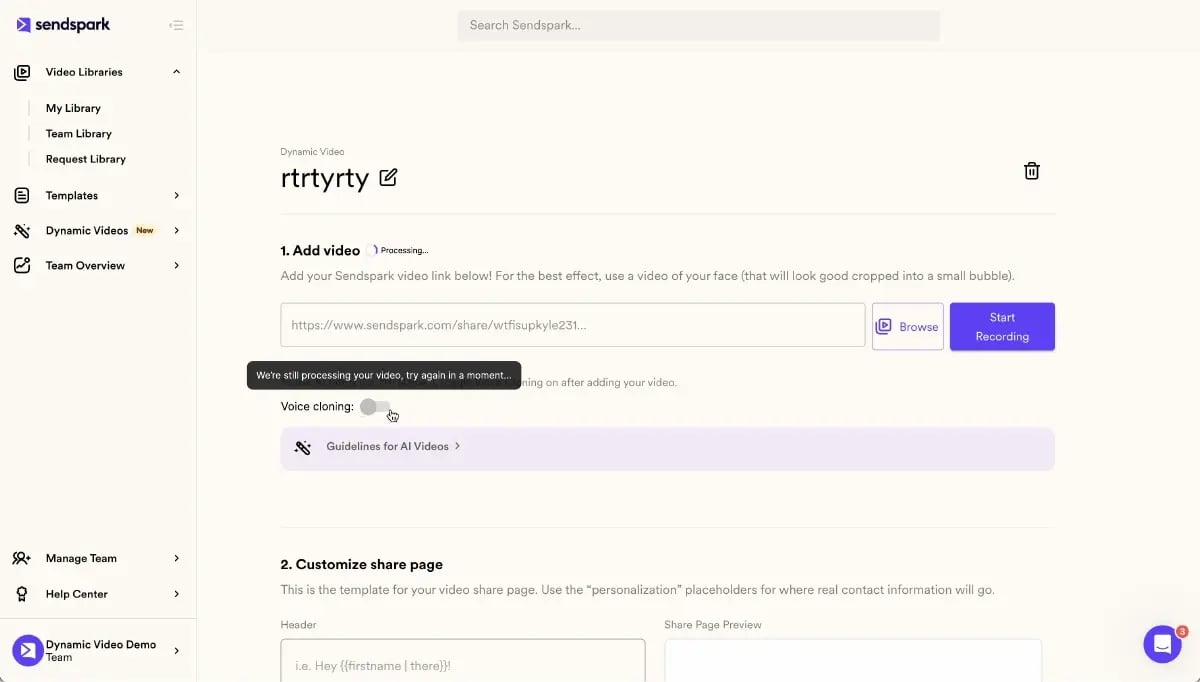
Before AI, video prospecting was fundamentally a one-to-one activity. A rep who recorded 20 videos a day was considered highly productive — and 20 videos a day maxed out what was humanly possible while maintaining quality. The record once personalize thousands model changes the entire math. A rep using Sendspark’s AI video personalization platform records a single, polished video once. The AI then generates hundreds or thousands of individually personalized versions, each with dynamic video backgrounds that swap to the prospect’s website, industry context, or company branding, along with a personalized video thumbnail showing the prospect’s name and company — often called an AI-generated prospecting thumbnail — which is displayed before the prospect even clicks play.
The result is that prospects receive what feels like a hand-crafted, individual message — because in every meaningful sense it is personalized — while the rep’s time investment is a single recording session. Automated video prospecting at this level was not possible even two years ago. Today it is the baseline for high-performing SDR teams. The best teams are taking this further by building a multi-touch video sequence into their outreach cadence: an AI-personalized first touch, a follow-up video referencing that first video, and a final-touch video triggered by specific prospect behavior. This is what a fully optimized video prospecting cadence looks like in 2026.
Advanced strategy
Build a signal-triggered video prospecting cadence: when a prospect visits your pricing page, Sendspark automatically sends an AI-personalized video referencing that exact signal — all without any manual recording. This is the future of automated video prospecting.
Signal-triggered video outreach is the most advanced application of this technology. Rather than sending video prospecting on a static schedule, your sequences respond to real-time prospect behavior. A prospect who visits your pricing page receives an AI-personalized video within minutes that acknowledges their interest and answers the questions pricing page visitors typically have. A prospect who opens your email three times in 24 hours gets a follow-up video that references their clear interest without being creepy about it. This kind of context-aware, automated video prospecting was the exclusive territory of enterprise ABM programs two years ago. With an AI video personalization platform like Sendspark, it is now accessible to any sales team running structured sequences.
To explore the full technical capabilities, see AI video personalization and AI-powered intros on the Sendspark platform. For a broader strategic view of where personalized video is heading, our complete guide to personalized video marketing covers the full landscape.
Video Prospecting Best Practices and What to Measure
Effective video prospecting is not just about recording great videos — it is about tracking the right metrics, iterating on what works, and building habits around proven best practices. The reps who consistently outperform with video are the ones who treat it as a measurable system, not a creative exercise.
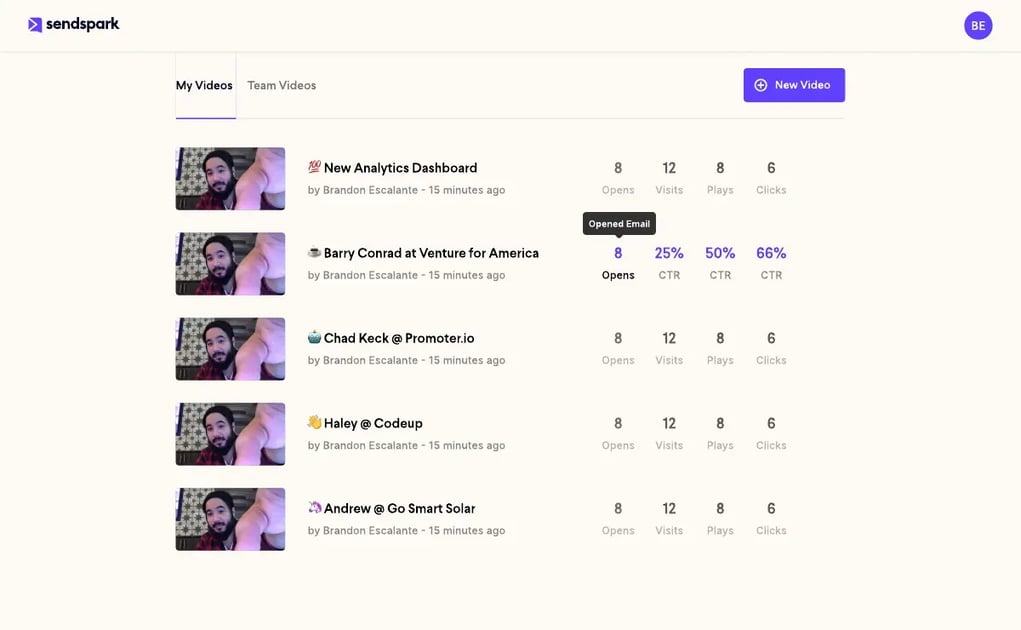
Metrics to track:
- Video reply rate: The primary success metric. Are prospects responding after watching? Compare it against the reply rate of your text-only sequences to the same audience.
- Watch-through rate: What percentage of the video do prospects watch? Aim for above 60%. If you are seeing drop-off at the 10-second mark, your opening is not working. If you are seeing drop-off at 30 seconds, your video is too long.
- Meeting booked rate: Of the prospects who reply, what percentage convert to a booked meeting? This measures the quality of your CTA and the relevance of your pitch.
- Click-on-CTA rate: For videos with a clickable call-to-action on the landing page, are prospects clicking through to your calendar, case study, or demo page? This is a leading indicator of intent even before a reply arrives.
Best practices that move the needle:
- Keep videos 30–90 seconds. Conversion drops steeply after 90 seconds for cold outreach. Treat every second as earning the right to the next one.
- Always personalize the thumbnail. The personalized thumbnail is the single biggest click-through rate driver in video prospecting. Use the prospect’s name, company logo, or website screenshot. A whiteboard with their name written on it still outperforms every polished generic alternative.
- Mention the prospect’s name in the first five seconds. This confirms immediately that the video is for them — not a broadcast they accidentally received. The psychological signal of hearing your own name in the first five seconds of a video is powerful.
- End with a specific yes/no question. “Would Tuesday at 2pm work?” beats “Let me know if you’re interested” in every A/B test. Give prospects something specific to respond to.
- Test three styles before locking in your format. Record the LinkedIn walkthrough, the selfie with personalized thumbnail, and the prop video. Run each one across 20–30 prospects before deciding which format suits your style and your prospect base.
Common mistake
Making your video too long. Videos over 90 seconds see conversion rates drop sharply. Keep your prospecting video tight — aim for 30-60 seconds for cold outreach, 60-90 seconds for follow-up.
| Video Type | Best For | Length | Key Element | Expected Reply Rate Lift |
|---|---|---|---|---|
| LinkedIn Profile Walkthrough | Strategic accounts, high-value ABM | 45–60 seconds | Screen-share of prospect’s profile | +40–60% vs text |
| Personalized Selfie + Landing Page | High-volume cold outreach | 30–45 seconds | Personalized thumbnail + branded landing page | +50–80% vs text |
| AI-Personalized (voice cloning) | Full list campaigns, SDR sequences | 30–60 seconds | Prospect’s name + company spoken in rep’s voice | +200–300% vs text |
| Prop / Unboxing Video | Product-led industries, retail, CPG | 45–75 seconds | Physical prop relevant to prospect’s product | +35–55% vs text |
| Event Attendee One-to-Many | Post-event follow-up at scale | 45–60 seconds | Shared event context + individual name (AI) | +30–50% vs text |
| On-Location Video | Field sales, real estate, energy, construction | 60–90 seconds | Relevant physical location as visual proof | +40–65% vs text |
For the tools to run this playbook, see video prospecting software from Sendspark, along with video analytics to track performance and personalized video messaging for your full outreach workflow.
Frequently Asked Questions
What are the best video prospecting examples?
The best-performing video prospecting examples include the LinkedIn profile walkthrough (screen-sharing a prospect’s own profile while narrating your pitch), the prop video (holding something directly relevant to the prospect’s industry or product), the personalized selfie with a branded landing page, and the singing cold pitch for personality-forward sellers. The embedded Sendspark examples in this post — including the on-location solar pitch and the event attendee one-to-many — are among the clearest illustrations of what high-converting prospecting video looks like in practice in 2026.
How do you create a good prospecting video?
Start by personalizing your thumbnail with the prospect’s name or company — this is the single biggest driver of click-throughs before anyone even watches a second of your video. Open by saying the prospect’s name within the first five seconds, reference one specific detail about them or their company, keep the video under 90 seconds, and end with a single direct question they can answer with a yes or no. If you are sending at scale, use AI voice cloning to auto-personalize your video for every prospect on your list without re-recording.
What should you say in a video prospecting message?
Structure your script around the prospect, not yourself: open with their name and one specific observation about their company or role, spend no more than one sentence explaining who you are and what you do, connect their specific situation to the outcome you help create, and close with one direct question. Avoid generic openers like “I help companies like yours…” — specificity is what separates videos that get replied to from videos that get ignored. The scripts in this post are a direct starting point.
How long should a prospecting video be?
For cold outreach, aim for 30–60 seconds. For follow-up videos, 60–90 seconds is appropriate since there is already context established. Never exceed two minutes in a prospecting context — watch-through rates and conversion rates both fall sharply beyond that threshold. If you find yourself consistently going over 90 seconds, strip the video back to one observation, one outcome, and one question, and re-record from that foundation.
Does video prospecting actually work?
Yes — the data is consistent and strong. Salesloft research from 2018 found that sales emails containing video got 26% more replies than emails without video, and AI-personalized video sequences are generating 200–300% higher response rates compared to standard cold email. Teams using personalized video in LinkedIn outreach are seeing reply rates double compared to text-only connection messages. The format works because it is inherently harder to ignore — a personalized video thumbnail in an inbox full of text demands attention in a way that text alone cannot.
How does AI personalize video prospecting at scale?
AI voice cloning captures the rep’s voice from a single recorded video and then automatically generates a unique version for every prospect on the list — speaking each prospect’s name and company name naturally in the rep’s own voice, without re-recording. Sendspark pairs voice cloning with dynamic video backgrounds that swap to each prospect’s website or relevant context, and auto-generates a personalized thumbnail showing the prospect’s name, creating a fully individualized experience for every recipient from a single source recording. The process is entirely automated once the initial video and prospect list are uploaded.
What is the best video prospecting tool in 2026?
For teams that need to personalize video prospecting at scale, Sendspark is the leading AI video personalization platform — it combines AI voice cloning, dynamic video backgrounds, personalized thumbnails, and personalized landing pages into a single workflow that lets a rep record once and automatically reach thousands of prospects with individually tailored videos. When evaluating any video prospecting tool, look for native AI voice cloning, dynamic background personalization, thumbnail personalization, detailed watch-through analytics, and CRM integrations that allow signal-triggered sending — those are the capabilities that separate high-performing prospecting platforms from basic screen-recording tools.
Sources & References
- Salesloft — “Teams that use video enjoy a 16% bump in open rates and a 26% increase in replies” (2018)
Record One Video. AI Personalizes Thousands.
Sendspark is the AI video personalization platform for B2B sales. Record once, and AI voice cloning generates thousands of individually personalized videos with dynamic backgrounds and personalized thumbnails — each prospect hears their name, sees their website, in your voice. Sales teams see 2-3x more replies.
Get Started NowTopics: Tips & Tricks