Asynchronous video communication is a way to connect with prospects using pre-recorded videos they can watch at their convenience. Unlike live calls or meetings, this method doesn’t require both parties to be available at the same time. Instead, sales professionals can record personalized messages to explain solutions, present proposals, or answer questions, while prospects view them on their own schedule. For context on Loom lag affecting async video workflows, see our in-depth guide For a full framework, see our asynchronous selling guide. Teams that combine async video with live Slack screen sharing cover both real-time and on-demand collaboration, and our guide on how to send a personalized video message in Slack covers the async side specifically.
Here’s why it works:
- Convenience: Eliminates scheduling conflicts, as videos are accessible 24/7.
- Efficiency: Reduces time spent on meetings and streamlines outreach.
- Higher Engagement: Videos feel personal and are more engaging than text-based emails.
- Trackable Results: Analytics show who watched, how long, and if they took action.
With tools like Sendspark, sales teams can create one video, personalize it at scale using AI, and share it across email, LinkedIn, or other platforms. This approach helps increase response rates, book more meetings, and close deals faster - all while saving time and effort.
Asynchronous Video Communications for Sales Team
How Asynchronous Video Differs from Live Communication
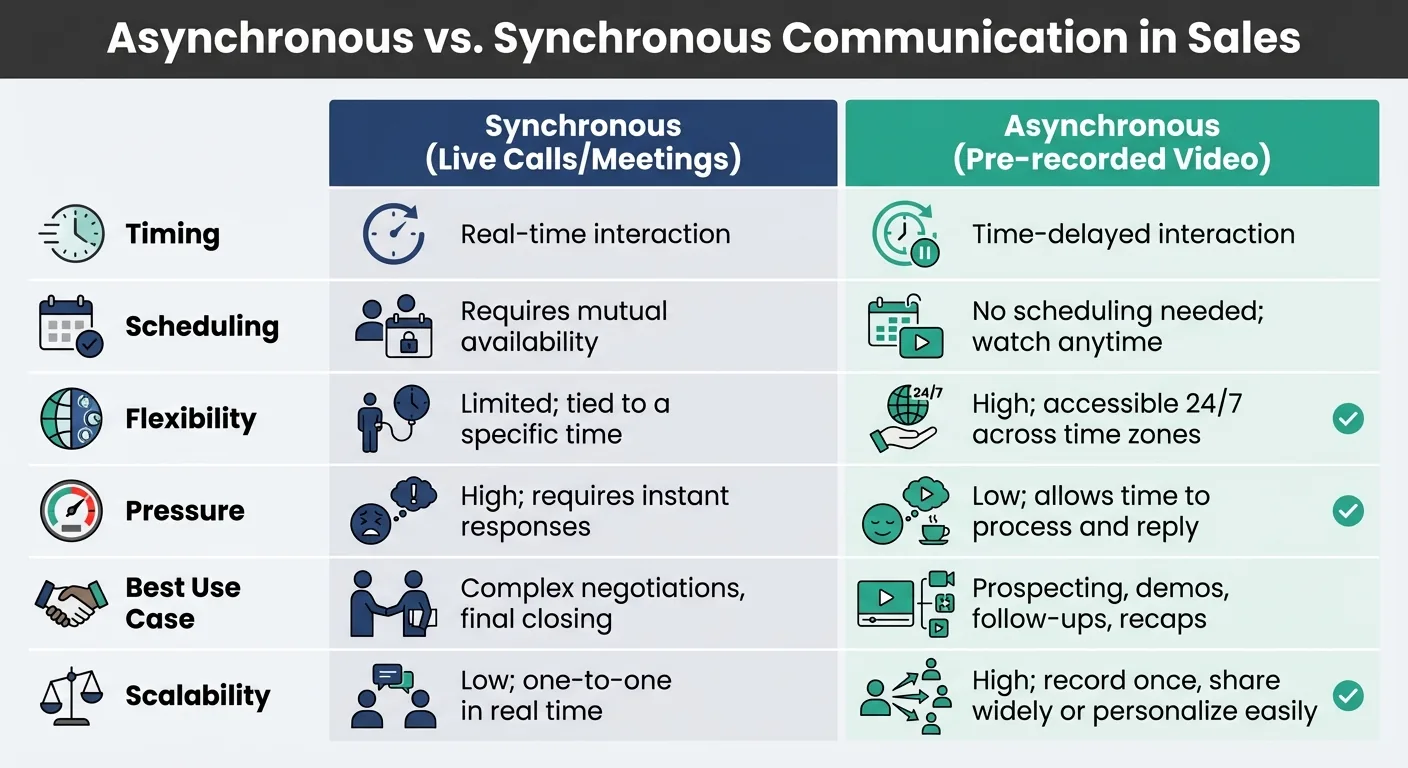
Asynchronous vs Synchronous Video Communication in Sales
The main difference boils down to timing. Live calls and Zoom meetings require everyone to be available at the same moment. Asynchronous video, on the other hand, lets you record at your convenience and allows your prospect to watch whenever it suits them - whether that’s early in the morning or late at night.
This flexibility eliminates scheduling conflicts that can drag out sales cycles. Your video is available anytime, ready to deliver your message across time zones without delay.
There’s also a shift in pressure and control. Live calls often put prospects on the spot, forcing them to respond immediately. Asynchronous video, however, gives them time to think, revisit parts they missed, and even share the content with other decision-makers - all without needing to coordinate another meeting.
This approach lets sales reps work smarter. You can record during your most productive hours instead of sticking to a rigid schedule. While one prospect watches your video, you’re already free to record another or focus on closing deals.
Asynchronous vs. Synchronous Communication: A Comparison
Here’s a quick breakdown of how asynchronous video stacks up against live communication in sales:
| Feature | Synchronous (Live Calls/Meetings) | Asynchronous (Pre-recorded Video) |
|---|---|---|
| Timing | Real-time interaction | Time-delayed interaction |
| Scheduling | Requires mutual availability | No scheduling needed; watch anytime |
| Flexibility | Limited; tied to a specific time | High; accessible 24/7 across time zones |
| Pressure | High; requires instant responses | Low; allows time to process and reply |
| Best Use Case | Complex negotiations, final closing | Prospecting, demos, follow-ups, recaps |
| Scalability | Low; one-to-one in real time | High; record once, share widely or personalize easily |
While live meetings are still critical for complex negotiations or closing deals, asynchronous video shines in areas like outbound prospecting, product demos, and follow-ups, offering better efficiency and broader reach.
Why Pre-Recorded Video Works for Sales Outreach
Pre-recorded video bridges the gap between delivering a personal touch and avoiding the constraints of real-time interaction. It allows you to show your face, share your screen, and clearly explain your value - without asking your prospect to rearrange their schedule.
This is important because 66% of people would prefer to watch a short video to learn about a product or service, according to Wyzowl’s 2020 survey. Buyers now prefer visual, easy-to-digest content they can engage with on their own terms. Traditional text emails often fall flat, and scheduling live calls can create unnecessary friction.
The numbers back this up. When Intercom added personalized video messages to their cold outreach, they saw a 19% boost in email reply rates and attributed $120,000 in revenue directly to this strategy. Similarly, ReviewTrackers’ sales team saw a 92% increase in email reply rates and doubled new customer meetings within 60 days using video in email campaigns.
Why does it work so well? Pre-recorded video feels helpful, not pushy. You’re offering valuable information without pressuring prospects for an immediate decision. They can watch at their own pace, pause to take notes, and revisit it when they’re ready to engage.
For cold outreach, keep your videos short - 45 to 70 seconds is ideal. That’s just enough time to introduce yourself, show you’ve done your homework, and explain why you’re reaching out, all while keeping their attention.
Benefits of Asynchronous Video for Sales Teams
Asynchronous video has become a game-changer for sales teams, improving performance metrics and streamlining daily workflows. From boosting response rates to saving time, its advantages are reshaping how sales professionals connect with prospects.
Higher Email Response Rates and More Meetings Booked
Adding video to sales outreach isn’t just trendy - it works. Over 70% of sales professionals say custom-recorded video performs better than text-based emails at producing opens, clicks, and responses, according to Vidyard’s State of Virtual Selling report. Campaign Monitor reports that video can boost email click-through rates by 65%.
Why does it work so well? Personalization. A video thumbnail featuring a prospect’s name, company logo, or even their website grabs attention instantly. Teams using video have seen a 16% rise in open rates and a 26% boost in reply rates, according to Salesloft’s analysis of 134 million sales emails.
Take HubSpot, for example. After its sales teams adopted video with Vidyard, they saw a 4x increase in booked meetings, according to Vidyard’s HubSpot case study.
Time Savings and Scalability
One of the standout benefits of asynchronous video is its ability to deliver personalization at scale. Instead of recording individual videos for every prospect, sales teams can create one base video and use sales AI tools to generate hundreds - or even thousands - of personalized versions in seconds.
This efficiency translates into major time savings. Nearly 60% of sales professionals who use custom-recorded video say it has increased their productivity, according to Vidyard’s State of Virtual Selling report. It eliminates the hassle of back-and-forth scheduling, time zone conflicts, and waiting for a prospect’s availability. You can record during your most productive hours and let the video do the heavy lifting.
Video also reduces the need for excessive meetings. Sending updates, recaps, or agendas via video keeps live sessions focused on key discussions. For instance, Loom estimates Intercom saved about 12 days of meetings and training across its roughly 900 employees by switching to asynchronous video.
“It has saved us hundreds of hours by creating informative video tutorials instead of long emails or 1-on-1 trainings with customers.” – Erica Goodell, Customer Success, Pearson
Beyond saving time, nearly half of sales reps who use custom-recorded video say it has shortened their deal cycles (Vidyard). This means faster deal closures and the ability to manage more prospects at once, all while gaining detailed insights to refine follow-up strategies.
Better Prospect Engagement and Analytics
Asynchronous video doesn’t just boost engagement - it makes it trackable. Unlike text-based emails that vanish into inboxes, video platforms provide analytics showing who watched, how long they watched, and whether they clicked your call-to-action.
These insights are game-changing for follow-ups. Notifications let you know when a prospect is watching, so you can reach out while your pitch is still fresh in their mind. Watch-time data highlights which parts of your message resonate and where you might lose their interest, helping you improve future outreach.
The engagement itself is stronger, too, which is especially valuable when explaining complex offerings.
A great example comes from ReviewThatPlace.com. They used Vidyard’s AI Avatars to scale their outreach and tracked results using video analytics. The outcome? A 760% increase in proposal views. By focusing on the most engaged prospects, they prioritized conversations that led to live follow-ups and better results.
Video analytics also help identify additional stakeholders within an account. If viewing requires an email, you can uncover new decision-makers who weren’t part of the initial conversation. These insights empower sales teams to refine their strategies and close deals faster.
sbb-itb-afd3f9e
How Sendspark Powers Asynchronous Video for Sales
Sendspark takes asynchronous video outreach to the next level by blending advanced personalization with streamlined efficiency. It’s designed specifically for sales teams that want to personalize their video messages without spending hours recording individual clips. With its AI-powered tools, Sendspark allows teams to create thousands of personalized videos from just one recording.
Personalization at Scale
Sendspark’s standout feature is its “record once, personalize at scale” approach. Instead of creating separate videos for each prospect, you record one base video with placeholders for key details like the viewer’s name. Then, Sendspark’s AI steps in, cloning your voice to seamlessly insert each prospect’s name, making it sound like you recorded the video just for them.
It doesn’t stop there. The platform also offers dynamic video backgrounds, which overlay your video onto the prospect’s website or a customized landing page - no extra recording needed. For added flexibility, the Combine Videos feature lets you record a short, personalized introduction (10–20 seconds) and merge it with a pre-recorded demo or presentation.
Sendspark even creates personalized thumbnails for each recipient, often including their name or company logo, to stand out in crowded inboxes and boost open rates. According to Sendspark, viewers are 35% more likely to watch personalized videos all the way through.
“I’m confident I’ve found the video prospecting tool, and it’s Sendspark. Welcome to the world where AI meets video.” – William Padilla, Account Executive, GRIN
To make things even smoother, Sendspark integrates seamlessly with your existing sales tools.
CRM Integration and Workflow Automation
Sendspark works directly with platforms like HubSpot, Salesforce, Outreach, and Klaviyo. You can import contacts via CSV or API and automate video creation within your sales sequences. For example, the HubSpot integration - rated 5/5 stars in the marketplace - lets you create personalized videos straight from contact records, with engagement data syncing back to the CRM automatically.
Automation is another major strength. Sendspark can generate and send personalized videos based on specific triggers, like a prospect reaching a certain stage in your pipeline or taking a particular action. Personalization tokens (merge tags) allow you to dynamically populate video thumbnails and landing pages with details like a prospect’s first name, company name, or job title. This means sales reps can set up automated sequences that personalize at scale, delivering each video on a branded landing page that can include embedded calendars for easy meeting scheduling.
And when it comes to follow-ups, Sendspark’s analytics have you covered.
Video Analytics and Performance Tracking
Sendspark provides in-depth analytics that show who watched your video, how much they viewed, and whether they clicked the call-to-action. This data syncs directly to your CRM, giving you a clear picture of prospect engagement without needing to jump between platforms.
Real-time notifications let you know when prospects start watching your video, so you can time your follow-ups perfectly. Plus, if you notice viewers consistently dropping off at a certain point - say, around 30 seconds - you can use Sendspark’s AI script generator to refine future videos, keeping them within the optimal 20–40 second range.
The results speak for themselves. Sendspark customer Update AI saw 3x more email conversions and 2x more LinkedIn replies compared to traditional text-based outreach. For example, Go Smart Solar saw immediate success, with Andrew Wood sharing: “We had the best sales day of the year after our first Sendspark campaign”. With a 4.8/5 star rating on G2 from over 350 reviews, Sendspark has proven to be a game-changer for sales teams looking to add a personal touch to their outreach at scale.
How to Create and Use Asynchronous Sales Videos with Sendspark
Start with one well-crafted base video, let AI personalize it, and share it where your prospects are most active. Here’s a step-by-step guide to creating effective asynchronous sales videos with Sendspark.
Step 1: Record Your Base Video
Pick your favorite recording tool to get started. The Sendspark Chrome Extension is great for quick browser-based recordings that integrate seamlessly with Gmail or LinkedIn. For higher-quality recordings or when working with applications like PowerPoint or PDFs, the Desktop App offers better audio and video synchronization.
Decide on your recording mode: Face, Screen, or Both (ideal for combining a personal touch with visual aids). Before hitting record, research your prospect and use the AI script generator to create a clear and concise message. Stick to this structure:
- Hook (0–10 seconds): Grab attention immediately.
- Introduction (10–20 seconds): Introduce yourself and set the tone.
- Problem (20–40 seconds): Highlight the challenge your prospect faces.
- Solution (40–70 seconds): Show how you can help.
- Call to Action (70–90 seconds): End with a clear next step.
Keep the video between 60 and 90 seconds for maximum impact.
Take advantage of camera effects to enhance your appearance. Use the 3-second countdown to prepare, and the recording toolbar to pause, resume, or restart as needed. If you’re planning to use AI-driven personalization, leave a brief pause or placeholder for the viewer’s name to be dynamically inserted. After recording, use the Trim feature to clean up any dead air at the start or end.
For example, Brikl’s sales team used Sendspark dynamic video campaigns in place of traditional email outreach. The result? A 46% increase in demo bookings.
Step 2: Apply AI-Driven Personalization
Once your base video is ready, set up a campaign in Sendspark and add dynamic tags for personalization. You can upload your contact list via CSV or sync directly from your CRM, such as HubSpot. Ensure the contact list includes key details like the recipient’s name, email, and company website URL.
Want to make your videos even more specific? Use the Custom Intro feature to record a short, personalized introduction (10–20 seconds) and seamlessly attach it to a pre-recorded product demo.
Step 3: Share Videos Across Channels
Now it’s time to distribute your videos where your prospects are most engaged. For email outreach, copy the “Linked GIF” (an animated thumbnail linked to your video) and paste it into your email or automation platform. The moving thumbnail grabs attention and boosts click-through rates.
For LinkedIn outreach, copy the video link or use Sendspark’s Instant Integrations to record and insert videos directly into LinkedIn messages. If you’re using a CRM like Salesforce, HubSpot, or Zoho, embed videos into automated sequences and track engagement through CRM reports. You can also share videos on platforms like WhatsApp, Telegram, Facebook, and Instagram using quick-share links, or embed them into your website or blog posts.
To make scheduling easy, include a Calendly or meeting booking link right below the video. This way, prospects can book a time with just one click.
“Sendspark videos work as pre-boarding.” – Emilia Korczynska, Marketing Manager at Userpilot, whose video emails more than doubled open rates
After sharing, keep track of how your videos perform to fine-tune your strategy.
Step 4: Analyze Engagement and Optimize
Use Sendspark’s analytics dashboard to see how your videos are performing. You’ll know who watched, how much they viewed, and whether they clicked on your call-to-action. This data syncs directly with your CRM, giving you a full picture of engagement without switching between tools.
Pay attention to viewer drop-off points to adjust your video’s pacing and content. Experiment with different approaches: tweak your hook, try a new call-to-action, or test various video lengths. Nearly half of sales reps who use custom-recorded video report shorter deal cycles (Vidyard). The insights you gather will help you refine what works and cut out what doesn’t.
Conclusion
Asynchronous video communication gives sales teams a way to make outreach feel more personal while scaling their efforts and closing deals more efficiently. With just one recorded video, you can customize it at scale, delivering messages that feel personal - like a one-on-one conversation - rather than generic mass outreach. This approach leads to stronger engagement, improved response rates, and actionable insights that pinpoint which prospects are genuinely interested.
The numbers back it up: asynchronous video reduces acquisition costs and aligns with what buyers prefer. These results highlight the power of personalized video outreach to drive meaningful connections.
Sendspark makes this process even easier by combining AI-driven personalization, seamless CRM integration, and real-time analytics in one platform. You can record a single video, add dynamic personalization - like inserting names or customizing visuals - and share it across email, LinkedIn, or your sales tools. Plus, Sendspark’s analytics dashboard gives you key insights, such as who watched your video, where they dropped off, and whether they clicked your call-to-action, helping you prioritize follow-ups and fine-tune your strategy.
This method isn’t about replacing live conversations - it’s about building trust and showing your value upfront, all on your prospect’s schedule. By proving your worth before the first interaction, asynchronous video sets the stage for meaningful and productive follow-ups.
With Sendspark, you can create one video, personalize it for thousands, and turn engagement into real opportunities.
FAQs
How can asynchronous video enhance sales engagement compared to traditional methods?
Asynchronous video lets sales professionals send personalized video messages that prospects can view whenever it suits them. This approach eliminates the hassle of coordinating schedules for real-time calls, making it much easier to connect with busy leads.
With asynchronous video, sales teams can deliver a more engaging and customized experience. This often results in better response rates, smoother communication, and a more efficient sales process. It also ensures consistent messaging while saving time and cutting down on acquisition costs. Whether nurturing leads, showcasing product demos, or following up after an initial conversation, this method proves to be a highly effective tool.
What are the main benefits of using Sendspark for asynchronous video communication in sales?
Sendspark empowers sales teams to connect with prospects on a deeper level by enabling them to send personalized video messages whenever it suits their schedule. This method not only saves time but also ensures a consistent message while adding a human touch to outreach efforts.
With Sendspark, businesses can cut customer acquisition costs by up to 40% and see better close rates. It’s an effective tool for engaging leads, building relationships, and sealing deals - all without the need for live, real-time communication.
How can sales teams create personalized asynchronous videos efficiently?
Sales teams can create personalized asynchronous videos effectively by adopting a core-plus-custom strategy. Begin with a polished base video that delivers your key message, such as a product overview or value proposition. Then, personalize it by adding details like the prospect’s name, their company’s logo, or addressing their specific challenges. This can be done through short video inserts, text overlays, or dynamic fields, saving you from having to record a new video for every prospect.
To make the process even smoother, group your prospects based on criteria like industry, buying stage, or recent interactions. Develop scripts tailored to each segment, and use tools that integrate with your CRM to automatically fill in variable fields. This approach allows you to batch-process videos efficiently. Boost engagement by including a custom thumbnail featuring the prospect’s name or a relevant image, paired with a clear, personalized call-to-action.
Finally, monitor metrics such as watch time and response rates to fine-tune your approach. Keep your videos short and to the point - under two minutes tends to work best for maintaining your audience’s attention.
Related Blog Posts
- How to Use Video in Sales Outreach Without Wasting Time
- 10 Video Prospecting Tips to Book More Meetings
- The Ultimate Guide to Video Selling in 2026
- Cvent acquires ON24, expanding its B2B sales engagement capabilities
Topics: blog