
Video prospecting is the future of SDR outreach. In 2026, tools like Sendspark, Vidyard, and Hippo Video are transforming how sales teams connect with prospects. These platforms use AI to create personalized videos at scale, boost engagement, and provide detailed analytics for smarter follow-ups. For a breakdown of the top sales Chrome extensions for prospecting, see our updated 2026 guide.
Key Highlights:
- Sendspark: Voice cloning, dynamic backgrounds, and CRM integration for high-volume outreach ($49/month).
- Vidyard: AI Avatars and enterprise-level analytics for detailed ROI tracking (free plan available).
- Hippo Video: Interactive features like polls and branching paths, plus advanced editing tools ($20/month).
Quick Comparison:
| Tool | AI Features | Analytics | Starting Price | Best For |
|---|---|---|---|---|
| Sendspark | Voice cloning, dynamic videos | Views, CTA clicks | $49/month | High-volume outreach |
| Vidyard | AI Avatars, CRM triggers | Viewer heatmaps | Free | Enterprise analytics |
| Hippo Video | Interactive flows, AI editor | Engagement tracking | $20/month | Interactive demos |
These tools simplify video creation, help SDRs stand out in crowded inboxes, and maximize efficiency. Keep reading for a deeper dive into each platform's features.
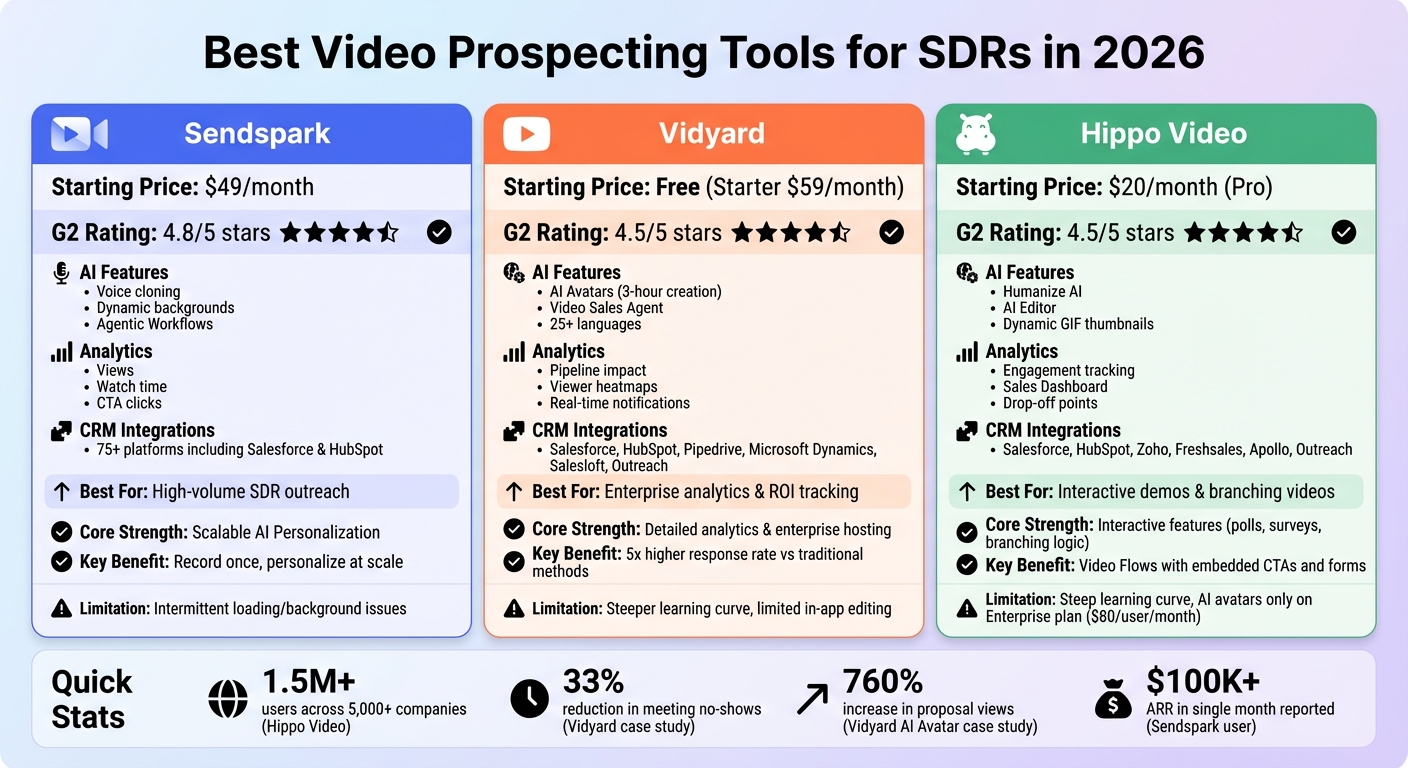
Video Prospecting Tools Comparison: Sendspark vs Vidyard vs Hippo Video Features and Pricing
1. Sendspark
Sendspark is designed for SDRs who need to send personalized videos efficiently without spending hours creating individual messages. Its standout feature is the "record once, personalize at scale" method: you record a single video with placeholders, and the AI swaps in each prospect's name using voice cloning. This feature works seamlessly across multiple languages, including English, Spanish, French, German, Swedish, and Portuguese. This approach allows SDRs to deliver a personalized touch without extra effort.
AI Personalization
Sendspark doesn't stop at voice cloning. It takes personalization further by dynamically overlaying each prospect's website or LinkedIn profile as the video background. It also creates custom video thumbnails featuring recipient details to grab attention. Each video is delivered on a branded landing page that can include personalized headers, tailored text, and embedded calendars for easy scheduling. The platform’s Agentic Workflows feature automates complex tasks, such as finding a prospect's website, generating a custom video with it as the background, and inserting it directly into an email sequence - eliminating the need for manual input.
William Padilla, an Account Executive at GRIN, said, "I'm confident I've found the best video prospecting tool, and it's Sendspark. Welcome to the world where AI meets video."
CRM Integrations
Sendspark integrates smoothly with over 75 platforms, including leading CRMs like Salesforce and HubSpot. It syncs video engagement data - such as who watched, how long they watched, and which CTAs were clicked - directly into your CRM. This allows SDRs to identify and prioritize high-interest leads within their existing workflows. Additionally, real-time email notifications alert sales reps whenever a prospect views a video, helping them follow up at the perfect moment.
Analytics Features
The platform provides detailed viewer tracking, showing exactly who watched your videos and how much of them they completed. Engagement heatmaps reveal where viewers lose interest, enabling you to adjust content and video length for better results. CTA click tracking and CRM syncing make it simple to pinpoint your most engaged prospects. One user reported earning over $100,000 in ARR in a single month by leveraging these insights.
Scalability
Sendspark’s pricing plans cater to businesses of various sizes. The Solo plan starts at $49/month (1 seat, 5,000 videos, 100 Dynamic Video Minutes), while the Business plan goes up to $699/month (25 seats, unlimited videos, 3,000 Dynamic Video Minutes, and a dedicated account manager). With a 4.8/5 rating on G2 from over 450 reviews, users frequently highlight how Sendspark streamlines personalized video creation and saves time compared to recording each video individually.
Dan Vermont, Head of Operations at Brikl, shared, "Using Sendspark transformed our customer success approach. We built a library of pre-recorded answers, allowing our team to quickly respond to common customer questions with personalized videos."
sbb-itb-afd3f9e
2. Vidyard
Vidyard takes personalized outreach to the next level using AI. With AI Avatars, you can create digital clones of yourself in just 3 hours using only 90 seconds of training footage. These avatars enable you to produce hundreds of personalized videos from simple text scripts - no need to step in front of a camera. The platform supports over 25 languages, including English, Spanish, German, Hindi, and Japanese.
AI Personalization
Vidyard has made video outreach more dynamic with its AI-powered personalization tools. One standout feature is the Video Sales Agent, which automates video creation and delivery based on CRM triggers. For example, when a prospect downloads content or books a demo, the system instantly generates a personalized video. By using CRM data tokens, these videos and their scripts are tailored to each recipient.
The results speak for themselves. Vidyard's internal sales team cut meeting no-show rates from 13% to 9% - a 33% drop. In 2025, Shakir Ansari, CEO of ReviewThatPlace.com, used AI Avatars to scale project pitches, achieving a 760% increase in proposal views and quadrupling his team's opens-to-meetings rate. One Vidyard account executive even managed to create 700 personalized videos in just one week.
"There's zero chance for me to be able to submit 50 pitches a day if I'm recording all those by myself"
CRM Integrations
Vidyard integrates effortlessly with top CRMs like Salesforce, HubSpot, Pipedrive, and Microsoft Dynamics, as well as sales engagement platforms such as Salesloft, Outreach, and Apollo. This allows users to record, send, and track videos directly within their existing tools. Engagement data - such as who watched a video and for how long - is automatically synced to CRM contact records, making it easier to identify high-intent leads. Additionally, Vidyard offers a Chrome extension, enabling users to create AI-powered videos directly from browser windows, including LinkedIn and CRM tabs.
Analytics Features
Vidyard provides real-time notifications whenever a prospect watches your video, allowing you to follow up while the content is still fresh in their mind. The platform also tracks detailed engagement metrics, showing who watched, when they watched, and for how long. For managers, performance dashboards offer insights into team engagement levels, helping identify top performers.
"The analytics are robust and provide me with weekly reports I can send to my higher-ups to show them how our open and close rates change"
Scalability
Vidyard’s free plan includes custom AI Avatar creation and 15 AI videos. For $59/month, the Starter plan offers unlimited videos, real-time insights, and interactive in-video CTAs. Higher-tier plans unlock premium features like the Video Sales Agent. Rated 4.5 out of 5 stars, Vidyard also won the 2025 MarTech Breakthrough Award for SalesTech Innovation. Companies using Vidyard for video prospecting have reported a 5x higher response rate compared to traditional methods.
3. Hippo Video
Hippo Video brings a fresh approach to video outreach with its Humanize AI feature. This tool allows SDRs to record a single base video and automatically create hundreds of personalized versions, addressing each prospect by their name and company. The platform also includes an AI Editor, enabling users to edit videos by simply tweaking the transcripts - just like editing a document. To top it off, AI-generated dynamic GIF thumbnails help improve email open rates.
AI Personalization
Hippo Video’s Video Flows library offers pre-built, customizable sequences that include embedded CTAs, forms, polls, and branching paths tailored to different stages of the customer journey. A built-in scrolling teleprompter ensures SDRs can deliver polished pitches without memorizing scripts. These tools make it easier to craft personalized, engaging video outreach that resonates with prospects.
CRM Integrations
Hippo Video integrates smoothly with major CRM and sales platforms, fitting right into your existing workflow. It works with tools like Salesforce, HubSpot, Microsoft Dynamics 365, Zoho CRM, Freshsales Suite, Pipedrive, Apollo, Outreach, Salesloft, and Klenty. This integration allows users to record, edit, and track videos directly within their CRM. Engagement data - such as video views and watch time - syncs back to the CRM, helping SDRs identify and prioritize the most interested prospects. With over 1.5 million users across 5,000+ companies, it’s clear the platform is widely trusted.
See our roundup of the video tools for SDRs.
"Hippo Video is my go-to tool for sending visual support videos to clients, intro-videos to new prospects, and cross-team project communication." – Paul Lacey, CEO, The Dickiebirds Studio
Analytics Features
The Sales Dashboard provides a centralized space to manage active leads, track top-performing video assets, and flag engaged prospects for follow-up. SDRs can monitor key metrics like AI-personalized video opens, link clicks, viewer location, and completion rates. Detailed analytics also reveal watch rates, total play time, and drop-off points, helping teams fine-tune their pitches.
Scalability
Hippo Video is built to grow alongside your outreach efforts. With strong analytics and automation features, it’s easy to scale without sacrificing personalization. The platform holds a 4.5/5 rating on G2 and earned 5/5 stars for Ease of Use, Pricing, and Features in 2026 evaluations. Pricing starts at $20 per user per month (Pro), $60 per user per month (Teams), and $80 per team per month (Enterprise), with a free plan available for basic functionality. The AI Avatar feature takes scalability to the next level, allowing users to generate unlimited personalized videos from a single recording - no need to create individual videos for every prospect.
Pros and Cons
Here’s a breakdown of the strengths and challenges of each platform, highlighting how they contribute to video prospecting for SDRs.
Sendspark boasts an impressive 4.8/5 G2 rating, largely due to its ease of use and features like AI-powered voice cloning and dynamic backgrounds. These tools let users record once and personalize at scale, making it ideal for high-volume outreach. However, users occasionally report loading delays and glitches with background removal. At $49/month, it’s a great option for teams prioritizing speed and efficiency [3,38].
Vidyard excels with detailed analytics, offering insights like pipeline impact and viewer engagement heatmaps that help teams measure ROI. Its SOC 2 Type II compliance and Salesforce integration make it a solid choice for enterprise teams. That said, the platform has a steeper learning curve, limited in-app editing options, and Business-tier pricing often exceeding $300/month. It’s better suited for account executives and marketing teams [3,37,38,40].
Hippo Video shines with interactive features like polls, surveys, and branching logic, turning videos into dynamic two-way conversations. Its teleprompter and advanced editing tools support polished, multi-step sequences. On the downside, it has a steep learning curve, and its AI avatar feature is only available on the $80/user/month Enterprise plan. It holds a 4.5/5 G2 rating, with users appreciating its robust features despite occasional inefficiencies in the interface [3,38].
For a broader look at editing-first tools like Veed.io versus outreach-focused platforms, see our Veed.io alternatives for B2B sales teams comparison.
| Feature | Sendspark | Vidyard | Hippo Video |
|---|---|---|---|
| Core Strength | Scalable AI Personalization | Enterprise Analytics & Hosting | Interactive & Branching Video |
| AI Capabilities | Voice cloning, Dynamic backgrounds | AI Scripting, AI Avatars | Digital Twins, Text-to-Video |
| Analytics | Views, Watch time, CTA clicks | Pipeline impact, Viewer heatmaps | Engagement & Interactive data |
| Best For | High-volume SDR outreach | Teams needing detailed ROI data | Engaging, interactive demos |
| Starting Price | $49/mo | Free (Limited) | Free (Limited) |
| Limitations | Intermittent loading/background issues | Complex UI, higher cost | Steep learning curve |
For SDR teams focused on high-volume outreach, these tools offer faster turnaround times and more frequent video prospecting opportunities to close larger deals. Each platform’s distinct features make it easier to create personalized, efficient, and engaging content tailored to specific needs.
Conclusion
For SDRs, improving video outreach has become a game-changer, and Sendspark offers the tools to make it happen. Its automation and personalized video content capabilities are perfect for teams managing high-volume outbound campaigns. Once a prospect moves from outreach to the deal stage, sales teams can also get the prospect to sign PDF online to finalise proposals, agreements, or other documents without slowing down the process. Features like AI voice cloning and dynamic backgrounds allow users to create a single recording and transform it into thousands of personalized videos. With a Solo plan priced at $49/month and a multi-seat option for $149/month, Sendspark provides a cost-effective way for outbound teams to boost efficiency and scale their efforts.
Learn more about Sendspark dashboard features.
FAQs
How do I personalize videos at scale without recording each one?
You can now create personalized videos in bulk without the hassle of recording each one individually. With tools like Sendspark, you can record a single video using placeholders, and AI takes care of the rest. It customizes each video with specific details, such as the recipient's name or background. All you need to do is import your contact list, and within minutes, the platform generates tailored videos that are ready to be sent through your email or sales system. This makes your outreach faster and more efficient.
Learn more about sending videos through Outreach.
Which analytics should I track to know my videos are working?
Pay close attention to metrics like watch time and completion rate to understand how long viewers stay engaged and whether they finish your videos. Keep an eye on drop-off points to pinpoint where viewers lose interest, and track CTA clicks to measure actions such as link clicks or meeting bookings. These insights can help you fine-tune your content to better align with your sales objectives and drive stronger results.
What should I look for in CRM and sequencing integrations?
When choosing a tool, prioritize seamless synchronization that streamlines and automates your outreach efforts. Look for features like the ability to personalize videos using CRM data - such as a recipient's name or company details - and ensure it logs key engagement metrics, like video views and responses, directly into the CRM system.
The tool should also work well with sales engagement platforms, allowing you to embed videos into sequences automatically. Dynamic personalization capabilities and real-time tracking are essential for improving follow-ups and gaining actionable insights through analytics.